Core HR
Company Assets
Assets are issued against the employee record, so the laptop follows the person and offboarding cannot close while something is still out.
How it is used
Issue equipment against a person, and the offboarding clearance can then ask for it back by name rather than by memory.
How it works, screen by screen
Every screen below is the real one, photographed from a working tenant, with the route it lives at so you can go straight to it.
- 01
Issue equipment against a name
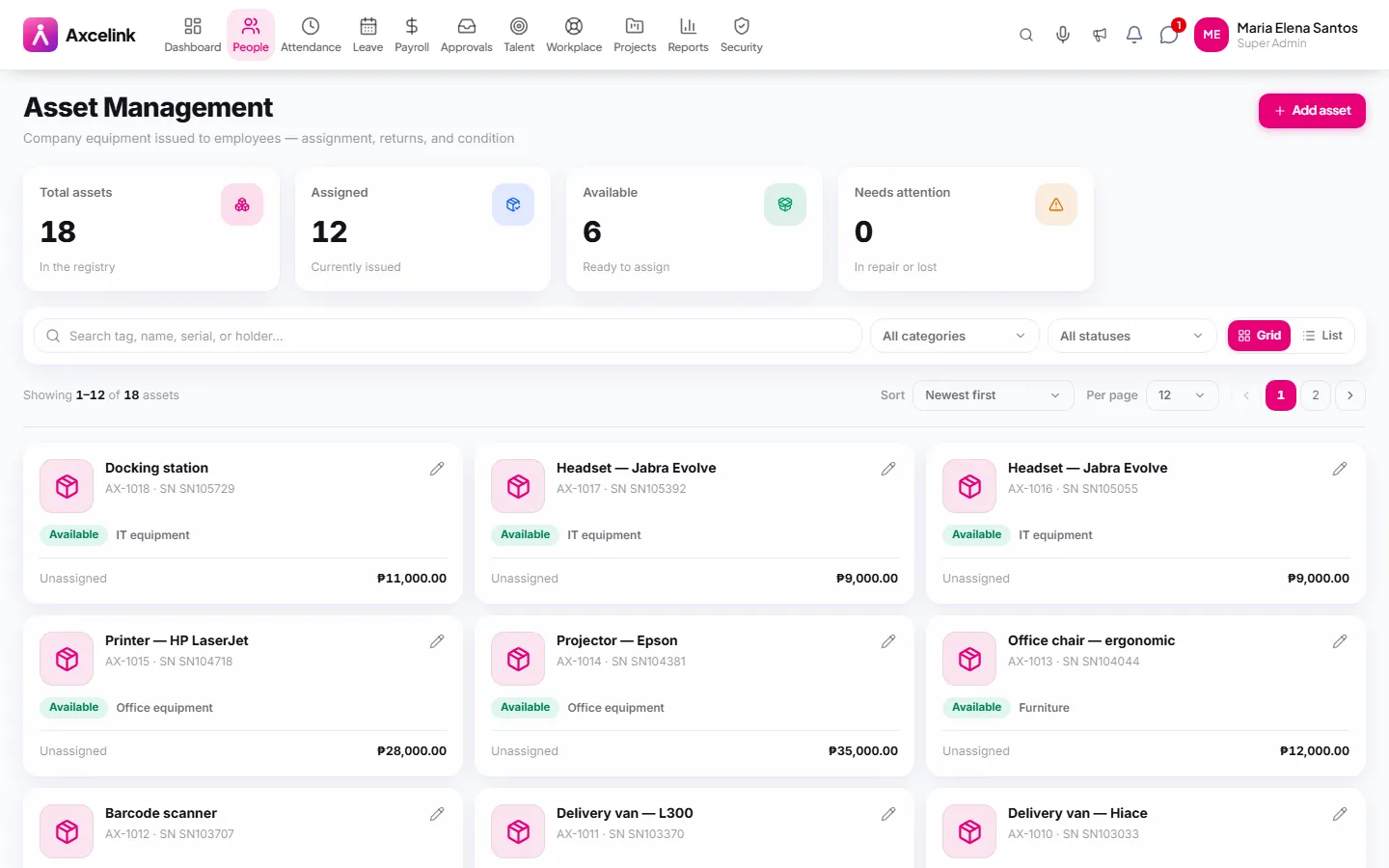
/admin/assetsEvery laptop, phone and SIM is logged with who holds it and in what condition. Offboarding clearance then asks for those items back by name instead of by memory.
What it does
- Asset register with category, serial and purchase details
- Assignment to an employee with date and condition note
- Return flow recording the condition it came back in
- Status tracking — in use, in storage, under repair, retired
- Full custody history per asset
- Employees can see what they currently hold
Where to find it
Administrators
- /admin/assets
What staff see
- /employee/assets
How it connects to the rest
Nothing below is an integration to switch on. These are the same records, read and written by more than one module.
Comes from
Feeds into
Looking for what this replaces and why it matters? See the Company Assets overview.