Time & Pay
Government Reports
Every statutory report is generated from the payroll register that already exists — the same numbers that were paid, in the format each agency expects.
How it is used
Builds the SSS, PhilHealth, Pag-IBIG and BIR files from the payroll already run. The statutory IDs it needs are the ones on each 201 file — a missing TIN shows up here rather than at the counter.
How it works, screen by screen
Every screen below is the real one, photographed from a working tenant, with the route it lives at so you can go straight to it.
- 01
Build the statutory files from the run
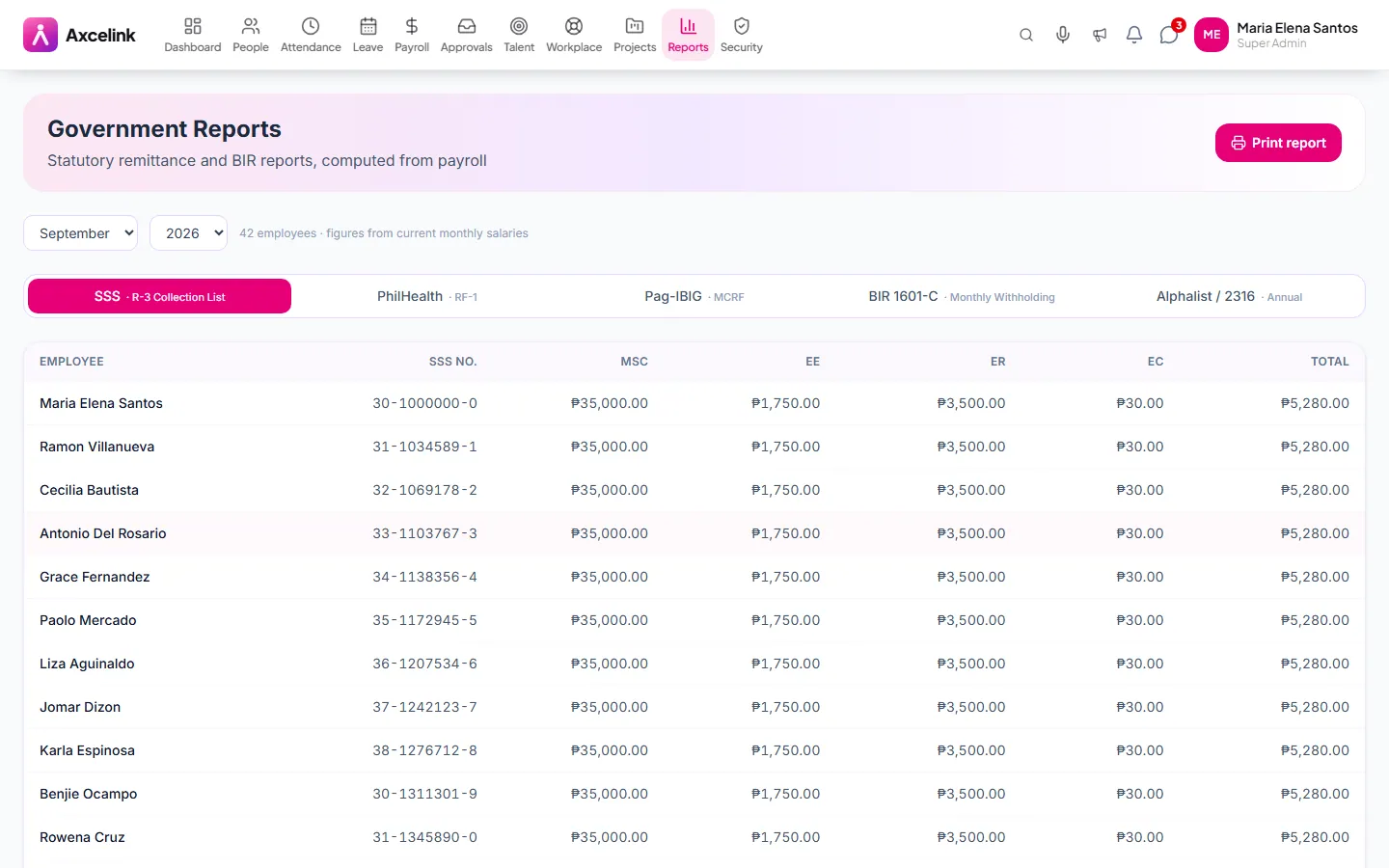
/admin/reports/governmentSSS R-3, PhilHealth RF-1, Pag-IBIG MCRF and BIR 1601-C and 2316 are generated from payroll that has already been finalised. A missing TIN or SSS number surfaces on this screen rather than at the counter.
What it does
- SSS contribution and loan remittance schedules
- PhilHealth contribution reports
- Pag-IBIG contribution and loan files
- BIR withholding tax reports and alphalist inputs
- Period-scoped, reproducible from the locked payroll register
- Export in the format each agency accepts
Where to find it
Administrators
- /admin/reports/government
How it connects to the rest
Nothing below is an integration to switch on. These are the same records, read and written by more than one module.
Comes from
Feeds into
Looking for what this replaces and why it matters? See the Government Reports overview.